Open source · runs on your servers

Page the right people. Let AI investigate. You decide what runs.

OpsMender is an incident response platform you host yourself. It tracks incidents, pages the on call engineer, and can hand an AI agent the tools to investigate and fix things. A gate in the backend decides what the agent may actually do, and the model has no say in it.

> docker compose -f docker/docker-compose.yml up
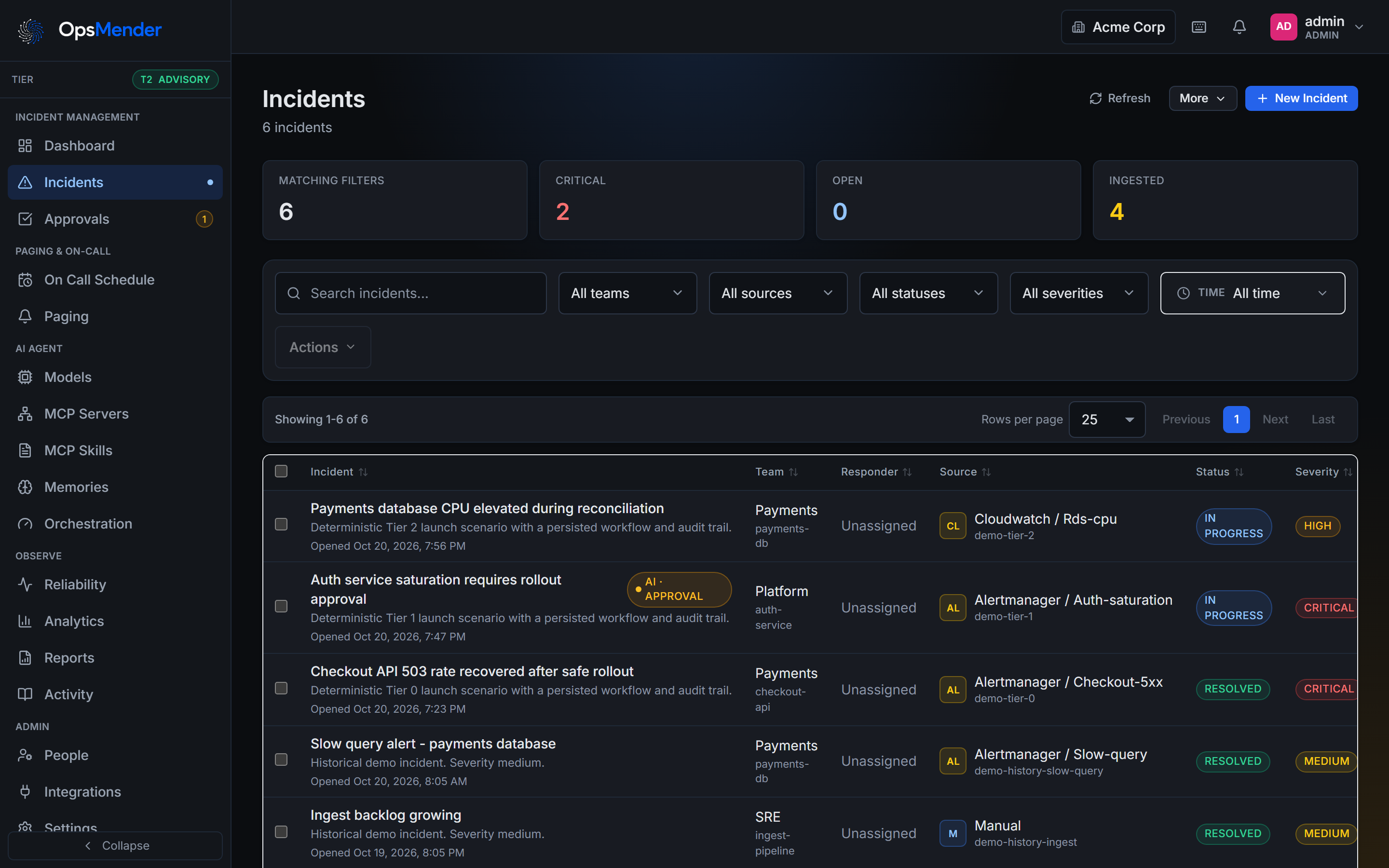
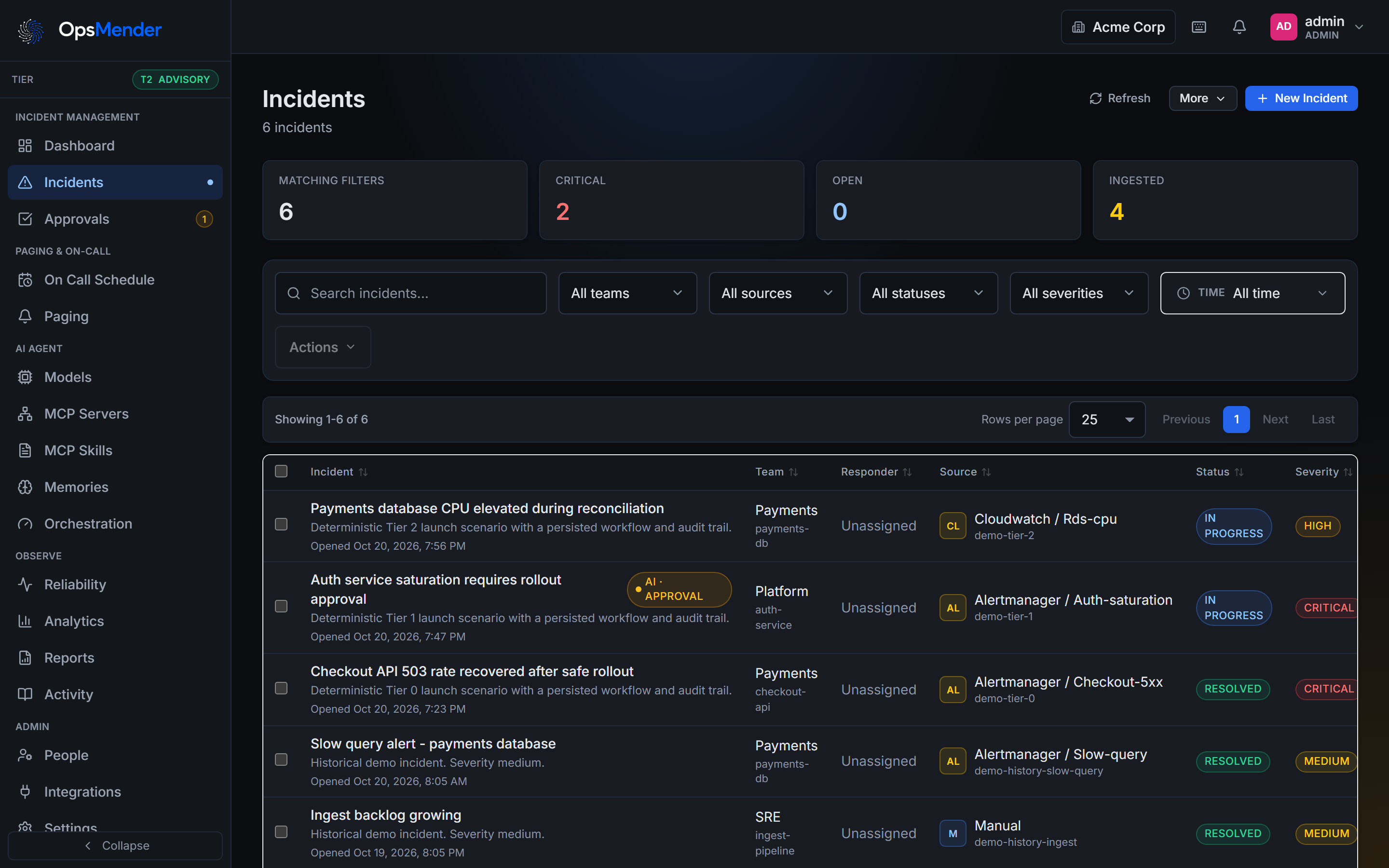
The incident command center: a list of incidents with priority, status, owner, and whether an AI session is running

How it works

Alerts in. The right person paged. An agent that works inside the lines you draw.

Every alert lands in one place

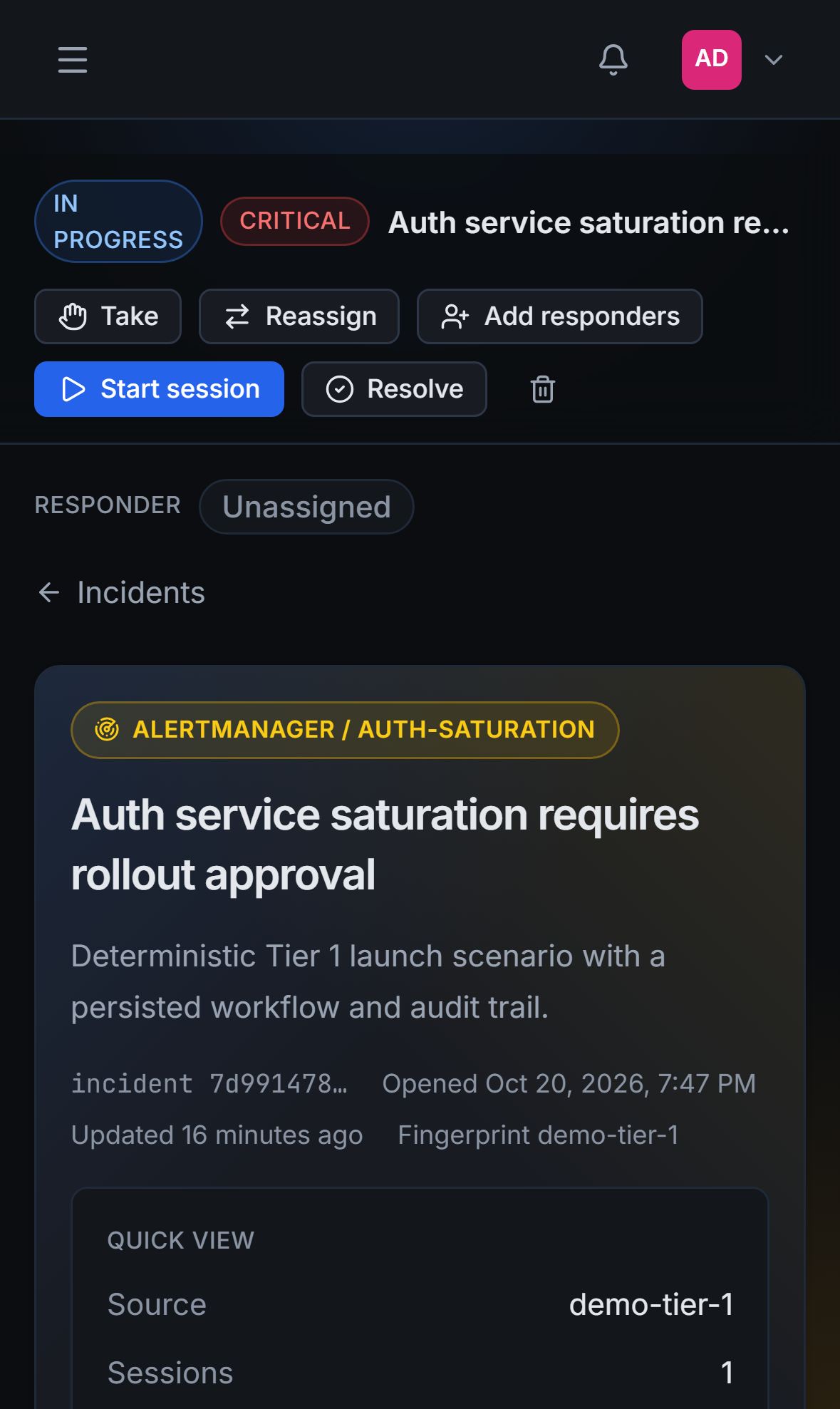
This alert opened the incident by itself. The amber tag means an AI session is already on it.

Every alert lands in one place

Sixteen sources have a parser. A re-firing alert updates the incident it already opened, similar alerts fold in, and maintenance windows keep matching alerts quiet.

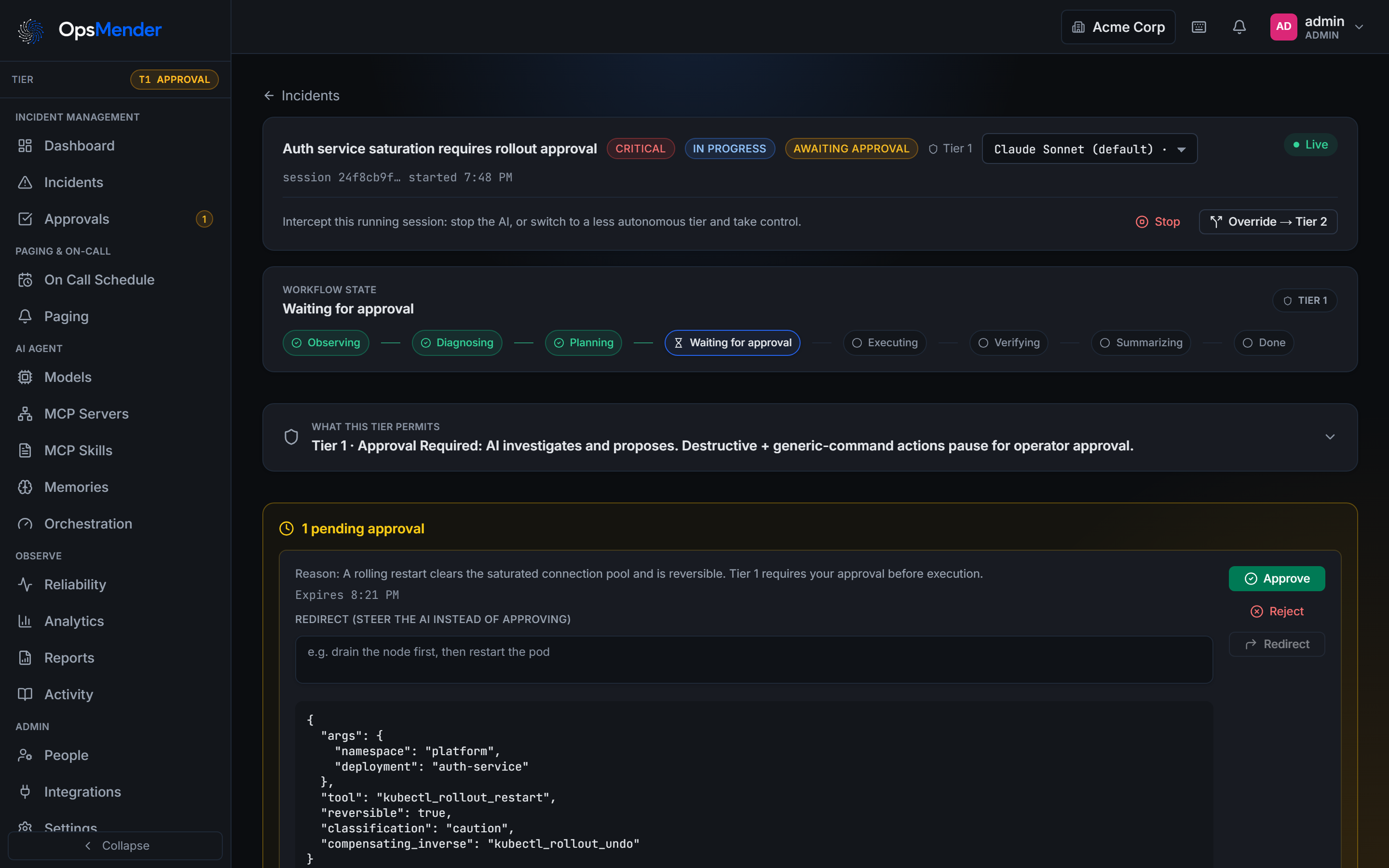
The agent investigates

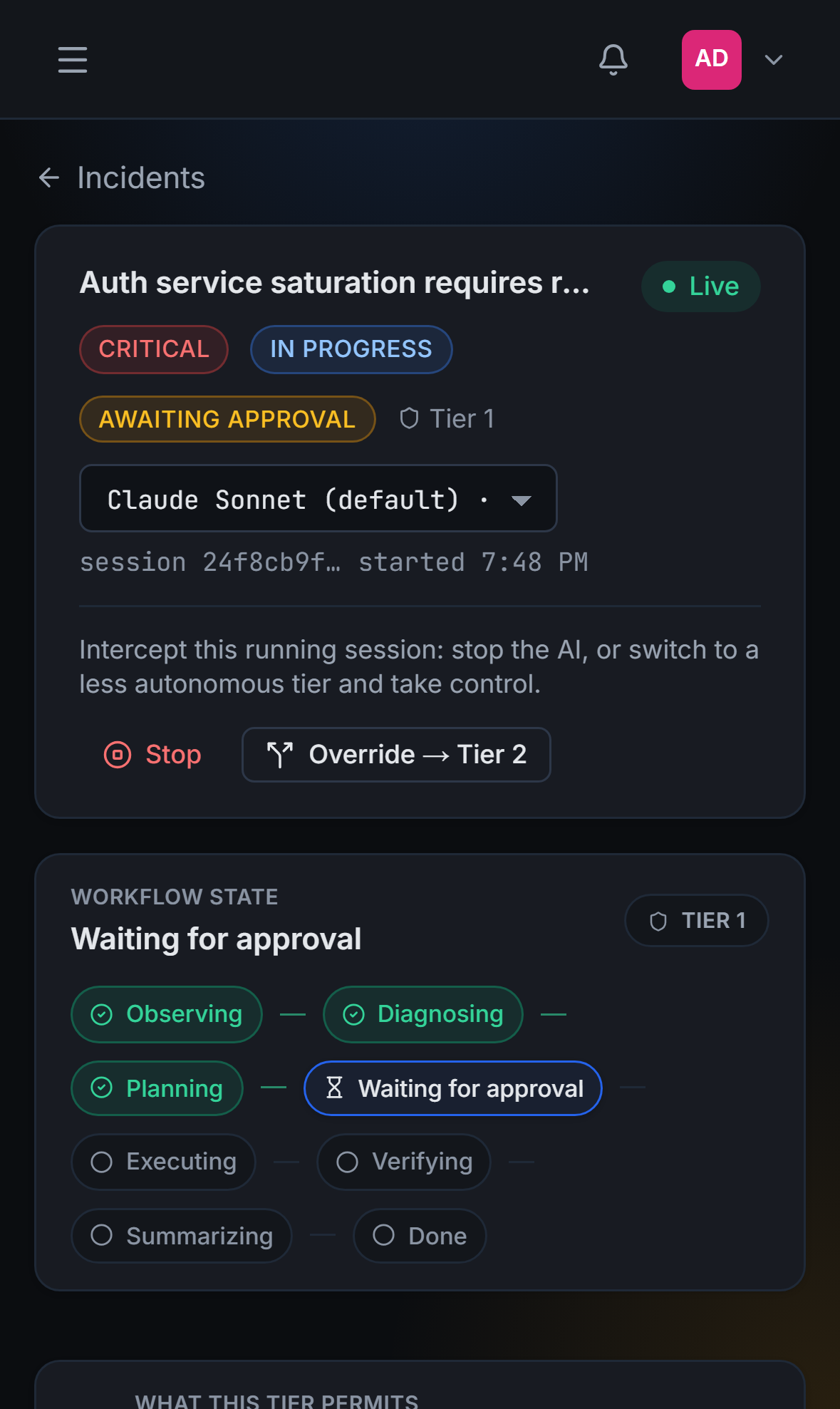
The agent observed, diagnosed and planned, then stopped at the gate to wait for a person.

The agent investigates

Observe, diagnose, plan, gate, act, report. Operators watch it live, chat with it, and stop it at any time. Reads happen right away; writes wait at the gate.

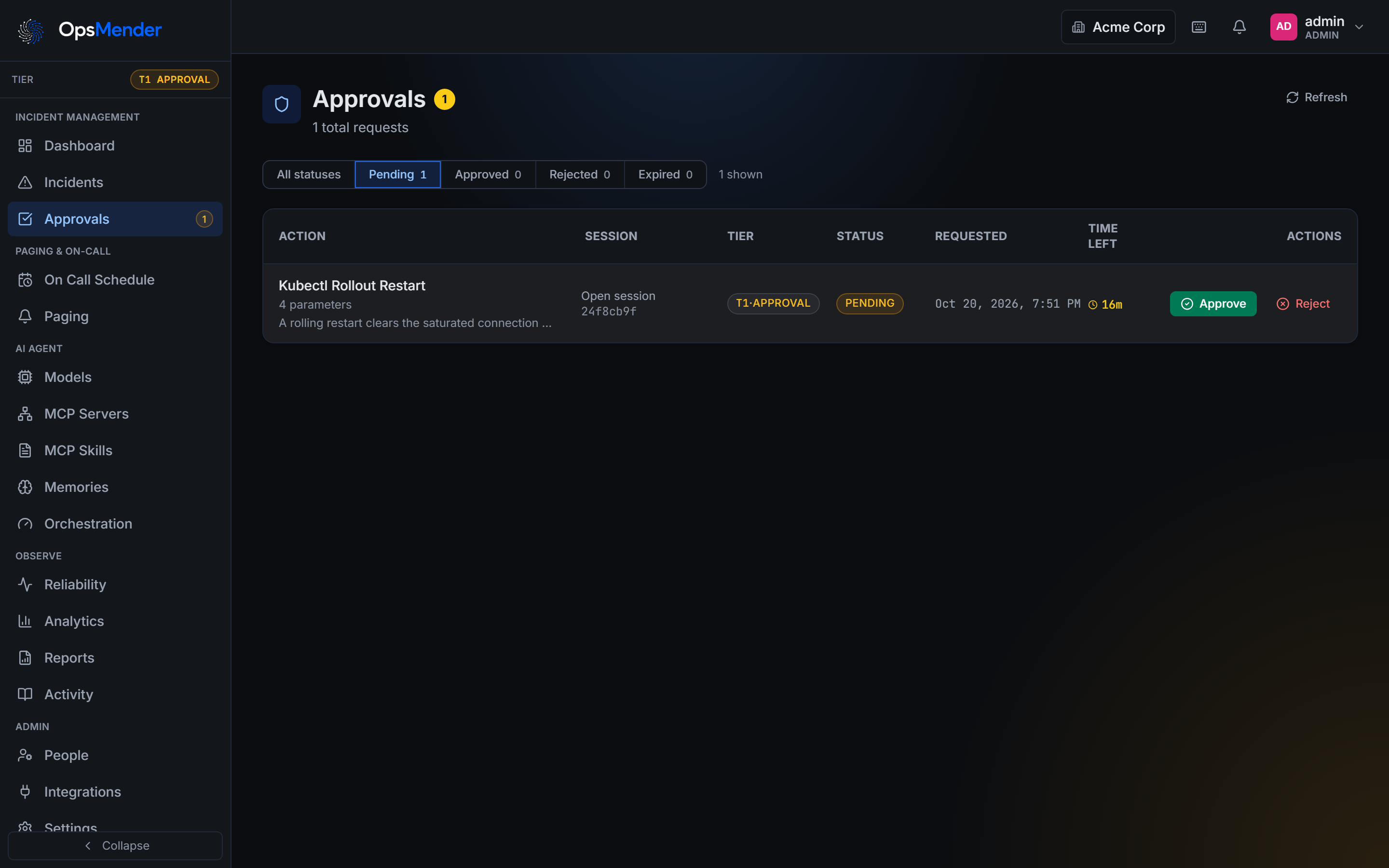
A person decides

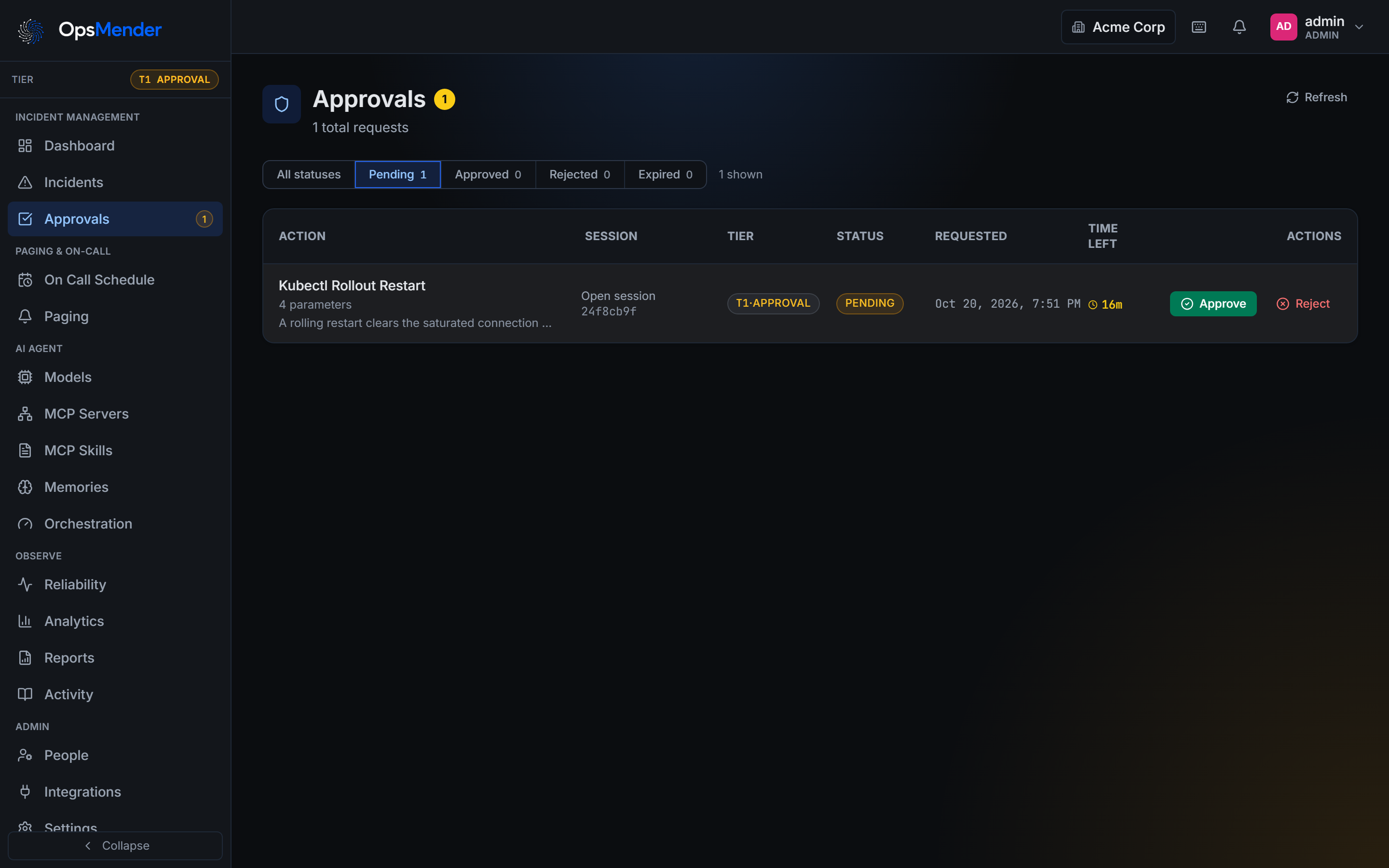
One request, with its tier, the time left, and the Approve and Reject buttons.

A person decides

Proposals sit in the approval inbox with their reasoning and the exact command. Approve, redirect, or deny. Everything lands in the audit log either way.

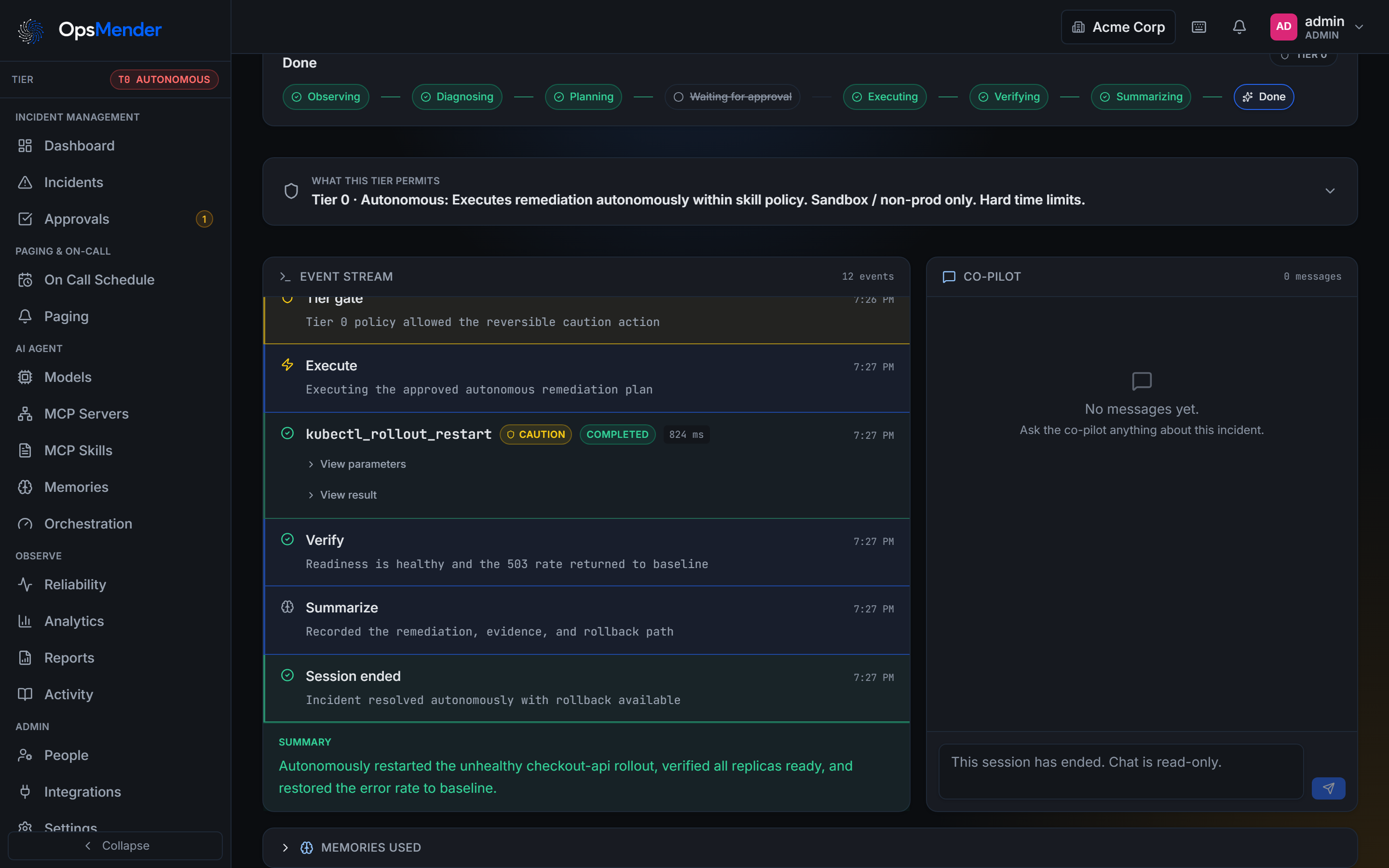
Autonomy

Three tiers. One is picked per session.

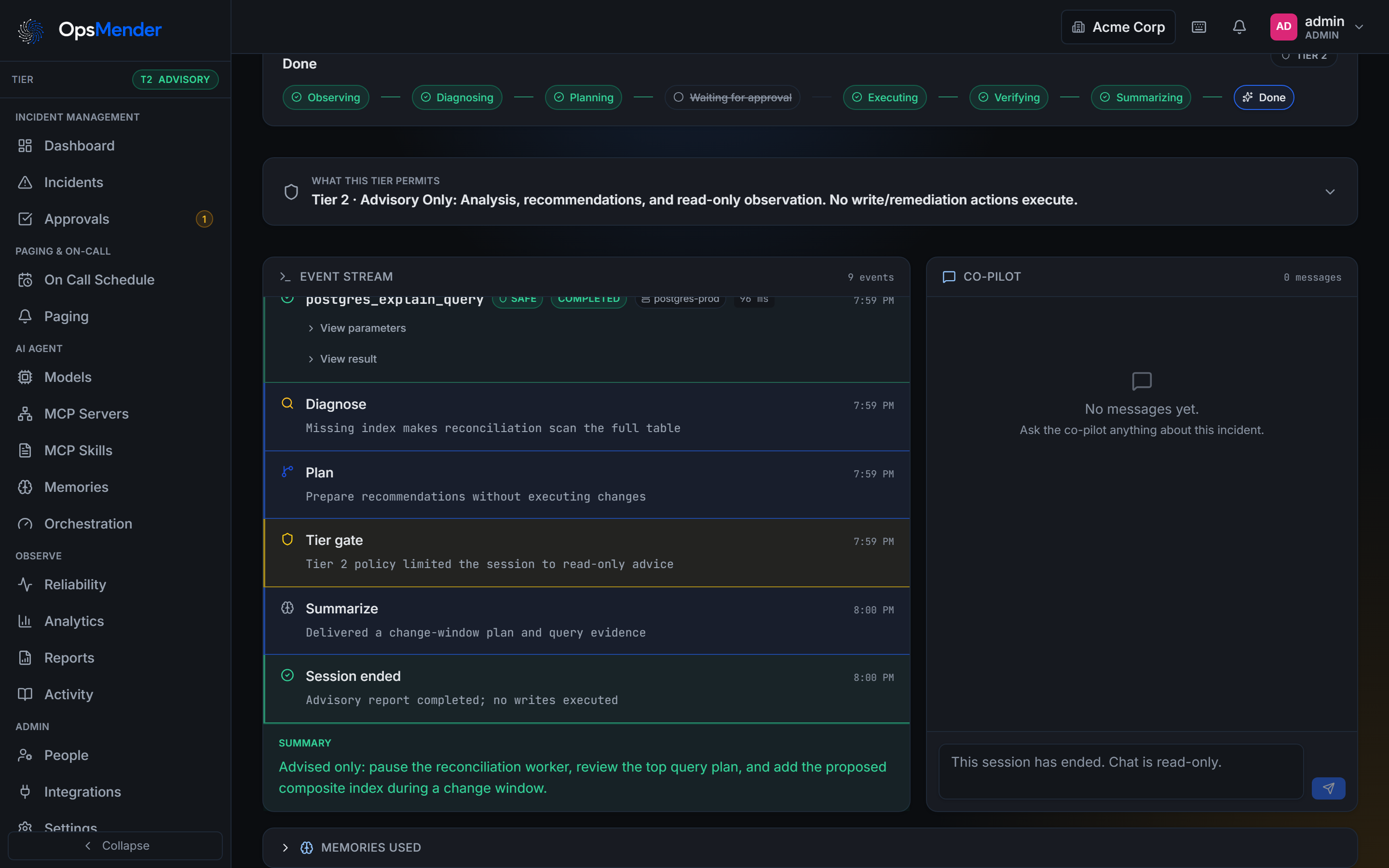
The tier is enforced in the backend before any tool call runs, so the agent cannot talk its way past it.

A Tier 0 sessionA Tier 1 sessionA Tier 2 session

A Tier 0 session restarted the deployment, confirmed recovery, and recorded how to undo it.

Integrations

OpsMender fits the tools your team already uses.

Alerts in from sixteen sources. Pages out to nineteen platforms, with buttons in Slack and Discord. Microsoft Teams support is being rebuilt. Any of eleven model providers. Your key stays in your server's environment and is sent only to that provider's API.

Slack
Discord
Telegram
Signal
WhatsApp
Matrix
Mattermost
Google Chat
Lark / Feishu
DingTalk
WeCom
WeChat
iMessage
Phone call
SMS
Email
AWS EventBridge
Home Assistant
Any webhook
AWS CloudWatch
Azure Monitor
Google Cloud Monitoring
OCI Monitoring
Sentry
New Relic
Dynatrace
Splunk
Grafana Loki
Elastic Watcher
AppDynamics
Honeycomb
Bugsnag
Rollbar
Generic webhook
Auto detect
Slack
Discord
Telegram
Signal
WhatsApp
Matrix
Mattermost
Google Chat
Lark / Feishu
DingTalk
WeCom
WeChat
iMessage
Phone call
SMS
Email
AWS EventBridge
Home Assistant
Any webhook
AWS CloudWatch
Azure Monitor
Google Cloud Monitoring
OCI Monitoring
Sentry
New Relic
Dynatrace
Splunk
Grafana Loki
Elastic Watcher
AppDynamics
Honeycomb
Bugsnag
Rollbar
Generic webhook
Auto detect

Twenty six built in connector kinds as well (twenty two with typed actions, three that deliver alerts, one HTTP probe), including GitHub, GitLab, Jira, ServiceNow, Kubernetes, Sentry, Argo CD and Terraform Cloud, with two way ticket sync for Jira and ServiceNow. Any MCP server you care to run.

Supported AI models

Bring the model you already use.

Hosted or local, picked per workspace or per service. Your API key stays in your server's environment and is sent only to that provider's API. A model can only ever read its own key.

AnthropicClaude
OpenAIGPT
Azure OpenAIYour Azure deployment
AWS BedrockModels in your AWS account
Vertex AIGoogle Cloud
OllamaLocal, nothing leaves the box
LM StudioLocal, on your own machine
QwenWith your Qwen API key
DeepSeekWith your DeepSeek API key
KimiWith your Kimi API key
Any OpenAI compatible endpointvLLM, llama.cpp, your own gateway

The gate

Built so the model never gets a vote.

Policy you own

A Skill file says, for every tool, what may happen at each tier: run on its own, wait for approval, advise only, or never. Anything it does not name is denied.

Enforced in code

The check runs in the backend before any tool call, in order: the deny list, the generic command guard, the per tier policy, the Tier 0 reversibility floor. The model never gets a vote.

Alert text is data

Alert text and tool output reach the model as data, never as instructions. Keys and passwords in tool output are removed. An alert that tries to give the agent orders is flagged for the person who decides.

Read the logs of a pod
T0RunsT1RunsT2Runs
Restart a deployment
T0Runs, can undoT1Waits for approvalT2Suggests only
Scale a service up
T0Runs, can undoT1Waits for approvalT2Suggests only
Delete a namespace
T0NeverT1NeverT2Never
Run an arbitrary shell command
T0NeverT1NeverT2Never

These rules live in a plain text file you keep next to your code, one per tool source. Change the file and the rules change. There is no switch the agent can flip, and anything the file does not mention is denied.

automated tests

0+

integration kinds

0

notification platforms

0

alert sources parsed

0

v1.3.0 · MIT license · changelog

Version 1.3.0

What's new

  1. Slack without a public URL

    Socket Mode lets a Slack channel receive card buttons and slash commands over a connection OpsMender opens to Slack. Put the app-level token in the environment; one process holds each socket and another takes over if it stops.

  2. Cards that act through a link

    Where a chat cannot carry buttons, a card carries one signed link per action. Opening it changes nothing; the person signs in, sees the incident and confirms once, under their own role. Microsoft Teams (Workflows) channels post these cards.

  3. Telegram keeps every page

    Every Telegram message is rendered as HTML with its content escaped, so a title or a model summary can no longer make Telegram refuse a page. Dashboard edits keep a channel's API-only settings, such as which chats a bot answers.

  4. Retired what did not work

    The environment scan audits and the older Teams channel type are removed; saved Teams channels stay and show that Teams is being rebuilt. Slack credentials are stored encrypted and stream tokens leave the URL.

Product

What it looks like

Real screens from a seeded workspace. Pick one below, or click the large image to see it at full size.

Incident detail

An incident with its AI session, timeline, and alert evidence in one view.

1 / 8

On your phone

Acknowledge from wherever you are.

There is no app to install. The page reaches you through the chat app you already use, one tap acknowledges it, the link opens the incident in your phone's browser, and you can talk to the agent before you let it act.

7:48

Tuesday, October 20

Slack · #payments-incidentsnow

OpsMender

New incident · P1 · Auth service saturation requires rollout approval. Paging the Payments roster.

#payments-incidents
OOpsMenderAPP7:48 PM

New incident

P1 · Auth service saturation requires rollout approval

Service: auth-service · Team: Payments

Responder: paging the Payments roster

✓Acknowledged by: you

AcknowledgeResolve EscalateStart AI session
ops.example.com
ops.example.com

Chat with the agent

Why a restart instead of scaling up?
The pool is saturated, not CPU bound. A rolling restart clears it, and it can be undone. Approve and I will run it.
Approve restartApproved · youReject

Under the hood

The whole system on one map.

Alerts come in at the top, the agent and its tools sit in the middle, and everything is recorded at the end. Tap any component to open its dossier.

Install

Running in a few minutes.

One compose file. Backend and frontend in a single container, with Postgres alongside it. Production mode requires a real signing secret and real bootstrap credentials; weak defaults are refused at startup.

Prefer a binary? Linux and Windows builds are on the releases page.

# Clone it
git clone https://github.com/SpicyDaemon/OpsMender-AI
cd OpsMender-AI

# Copy the example config, then set your model provider and API key
cp .env.example .env

# Start it
docker compose -f docker/docker-compose.yml up

# Open http://localhost:8000 and sign in with the admin from your .env

Try it today.
Start at Tier 2, turn the dial up when you trust it.